
Creative Problem Solving for Kids: SCAMPER
A practical way to help children look at a challenge from different angles, generate more ideas, and turn one ordinary starting point into something new.
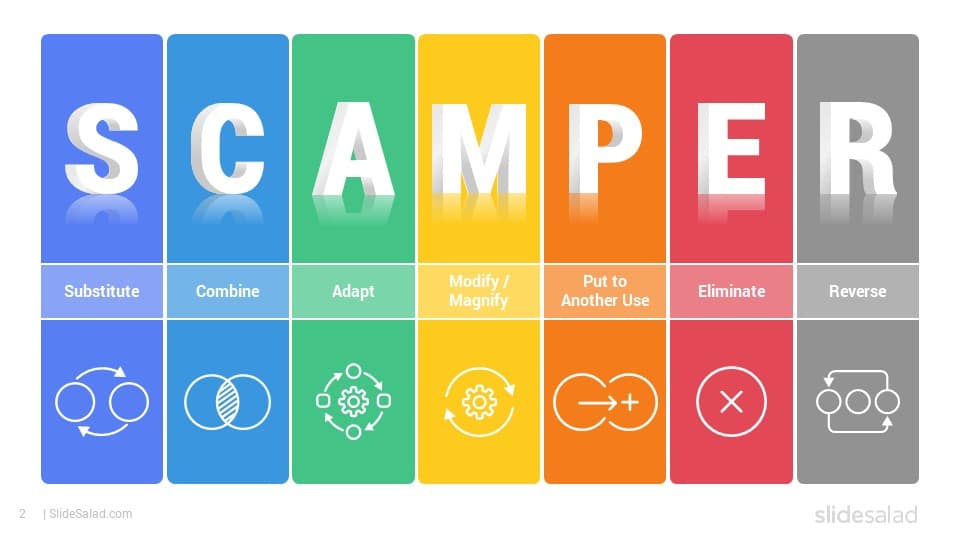
When children get stuck on a problem, they often do not need more information—they need a new way to look at it. SCAMPER gives them seven prompts that make “think of something creative” much more concrete.
Each prompt encourages a different kind of change: replace something, combine ideas, adapt an existing solution, modify it, repurpose it, remove part of it, or reverse the usual approach. A child can use one prompt or move through several to generate very different possibilities.
What is SCAMPER?
SCAMPER is a structured brainstorming technique. Instead of asking a child to invent an idea from nothing, it gives them a set of questions that help them transform something that already exists.
The strength of the strategy is that the seven prompts do not all produce the same type of idea. A child who is stuck after one approach can deliberately shift perspective and try another.
Substitute
Ask what part of the current solution could be replaced by something different. Children can substitute a material, a tool, a person, a rule, a location, or even the purpose of an object.
Combine
Combine asks children to merge two or more useful ideas into one. The pieces do not have to come from the same category.
Adapt
Adapt starts with something that already works and asks how it could be adjusted for a new situation. This helps children see that creativity does not always mean inventing from scratch.
Modify
Modify asks what could be changed about the size, shape, appearance, behavior, speed, or structure of an existing idea.
Put to Another Use
Here the child asks whether an object, resource, or idea could solve a completely different problem.
Eliminate
Creative thinking is not always about adding more. Sometimes removing a step, feature, material, or rule makes the solution better.
Reverse
Reverse asks children to change the order, direction, roles, or usual assumptions in a situation. This is especially useful when every idea feels too familiar.
SCAMPER Quest: a hands-on activity
This activity works best when the problem is open enough for many possible answers. Paper, a sketchbook, pencils or markers, and a few problem prompts are enough to begin.
Choose a problem
Offer a challenge such as designing transportation for underwater travel, inventing a way to make homework feel more like a game, or creating clothing inspired by animals.
Choose one SCAMPER prompt
Pick a single strategy first. Talk through what the prompt means before trying to solve the problem.
Brainstorm and sketch
Generate several ideas that follow the chosen prompt. Encourage unusual possibilities before judging whether they are practical.
Build a stronger solution
Select one or more ideas and combine or refine them into a more complete concept.
Try a different prompt
Repeat the challenge with another SCAMPER strategy and compare how the new lens changes the answer.
Explain the idea
Have the child present the problem, the strategy used, and how that strategy influenced the solution.
Reflect
Ask which prompt produced the most surprising idea and how changing the question changed the thinking.
Why this matters
SCAMPER turns creativity into something children can practice intentionally. Rather than treating creativity as a talent someone either has or does not have, the framework gives children repeatable ways to explore alternatives.
The same habits show up in coding and design work: define the problem, try an approach, observe what happens, change one part, and test again. That makes SCAMPER useful far beyond a single activity.
Want to connect creative thinking to something kids can build?
Explore Create2Discover’s free Roblox and Minecraft resources for hands-on creation activities. The resource comes first; classes are there when your child is ready for more structured instruction.
Want four free creation lessons?
Get hands-on Roblox and Minecraft lessons by email so your child can keep creating after this activity.